On the Infrastructure and Technology Stack Behind a Static Blog
Most introductions to static-blog building focus only on choosing a blogging system and hosting the generated files, which leaves beginners confused and unsure how to put the pieces together. This article walks through the full technology stack and the basic setup used for a static blog from writing, to publishing, to maintenance. Used as an index, it gives a full-picture view of static-blog creation.
Writing Posts
Markdown is a lightweight markup language written in plain text. With a few simple symbols and conventions, it can format headings, lists, links, images, and more. Markdown syntax is concise, easy to read, and easy to write. It can also be converted conveniently into HTML or mixed with HTML directly. Writing formulas in Markdown is also straightforward, almost like a lightweight form of LaTeX, which is essential for technical blogging. In short, anyone can become comfortable with Markdown in ten minutes and write more efficiently with it, so I strongly recommend it.
VS Code + Git For the editor, I recommend Microsoft’s free and open-source VS Code together with Markdown plugins. It supports live preview, formula editing, image insertion, and exporting, and it integrates smoothly with static-site frameworks. For version control, Git is optional but highly recommended because it records the change history and lets you roll back whenever something goes wrong.
Multimedia processing Blog posts often use images and video. To speed up loading and save bandwidth, cropping or compressing those assets is usually necessary. For that, I recommend squoosh and ffmpeg, both discussed in Tool Hall of Fame.
Static site generators These tools convert text files, usually Markdown, HTML, CSS, and JavaScript, into static HTML so that the final website consists entirely of HTML, CSS, and JavaScript. The basic workflow is to combine templates with content files, apply a set of rules and template engines, and generate static pages. Popular blogging systems such as Hexo and Hugo fall into this category. Because they are widely used, they have rich ecosystems of themes, plugins, and documentation, and they are both powerful and easy to use.
Domain Names, Storage, and Distribution
Once writing and page generation are complete locally, the next step is to publish the site to the internet. In earlier years that usually meant buying your own server or virtual host. Today there is a much cheaper and simpler route: buy a domain name, object storage, and CDN service from a cloud provider. A static blog is just a set of static files and does not need server-side processing, which means it can be hosted easily on a CDN for fast global access.
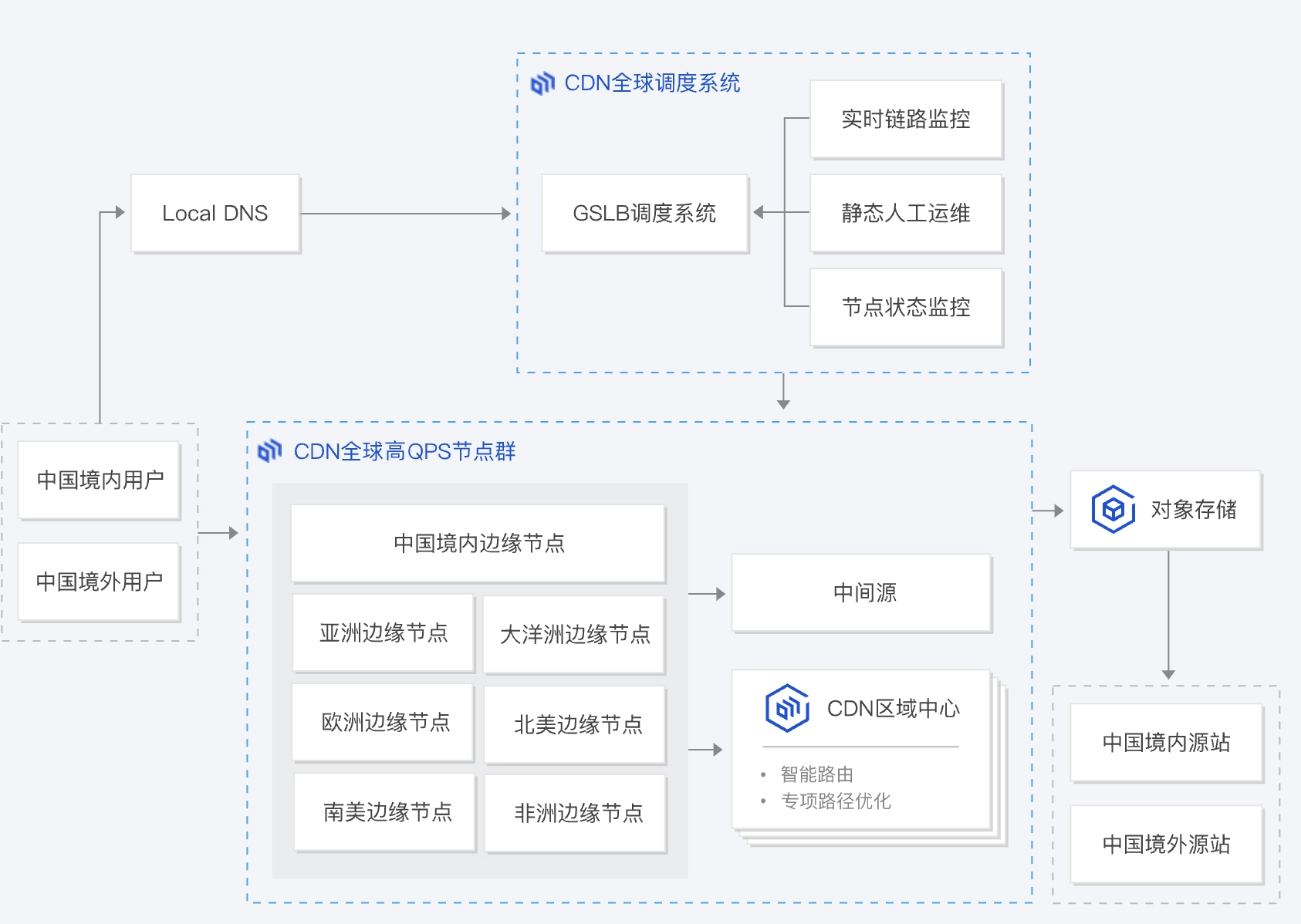
Domain name To make the site easy to visit, you normally need a domain name pointing to the server address that provides the content. A visitor’s client first queries a DNS server for the real IP address behind the domain name, then accesses that real address. Direct IP access is possible, but that is like identifying someone only by an ID number instead of a name, and it also makes load balancing less convenient.
You can buy domains from domain registrars. One practical point is that if you want to use servers in mainland China, you need an approved domain suffix and must complete regulatory filing. The most common top-level domains are .com, .cn, and .net, but new gTLDs have flourished in recent years and offer far more unregistered space. Creative domains such as youtu.be, ele.me, and t.tt are refreshing examples of so-called domain hacking, where the main name and the suffix are fused into a single expression. The domain used by HeThink, heth.ink, is an example built from “he” and “think”.
If you only want to experiment as a beginner or are short on cash, there are also some free domain options. Freenom offers free top-level domains, though the user experience is difficult to praise. Free second-level domains are more plentiful, such as the eu.org suffix that has been privately operated since 1996 and can be requested here. According to informal reports, some large companies already treat it almost like a top-level domain.
After obtaining a domain, the next step is to add DNS records. There are many free DNS providers; within China, I recommend DNSPod, which has been acquired by Tencent. Once you own a domain, you can add records for the root domain and for subdomains. For example, heth.ink is the root domain, while pan.heth.ink could point to a personal cloud drive.
Object storage Cloud object storage is a foundational cloud service that distributes massive amounts of data across multiple physical devices while letting users access it efficiently through a single virtual repository. In terms of content delivery, synchronizing the whole static blog to object storage is already enough in theory. This step can be automated with a simple script. Using Tencent Cloud COS as an example:
1 | !/bin/bash |
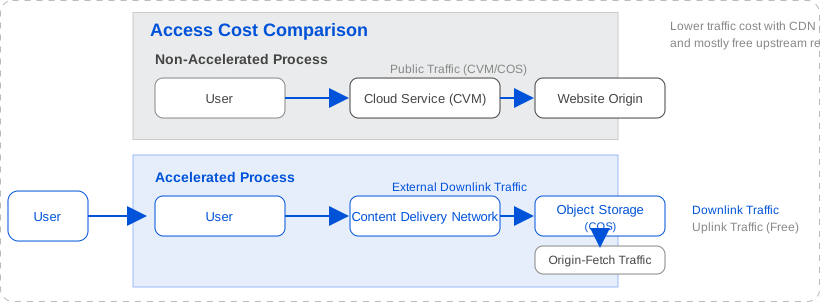
CDN A content delivery network is a system that distributes content such as text, images, and video efficiently through servers located around the world. By caching website content closer to the user, a CDN reduces transmission distance. That not only improves access speed, but more importantly lowers traffic cost. Compared with serving files directly from object storage, Tencent Cloud’s CDN traffic pricing is consistently lower, and when the cache hit rate is high the cost is often reduced by more than half.

Because both object storage and CDN can be billed by usage and consume very little compute, the operating cost of a small, lightly visited static blog is almost negligible. If you do not want to configure cloud services manually, some companies also offer static-blog hosting directly, which is more convenient, such as GitHub Pages and Cloudflare Pages.
Operations and Maintenance
Availability monitoring Website uptime can be monitored with DNSPod, which can send an SMS alert to the administrator if the site goes down unexpectedly.
Performance analysis I recommend PageSpeed Insight, also discussed in Tool Hall of Fame, for analyzing which parts of a page-load workflow can be optimized. Of course, analyzing network traffic locally in Chrome is also extremely effective.
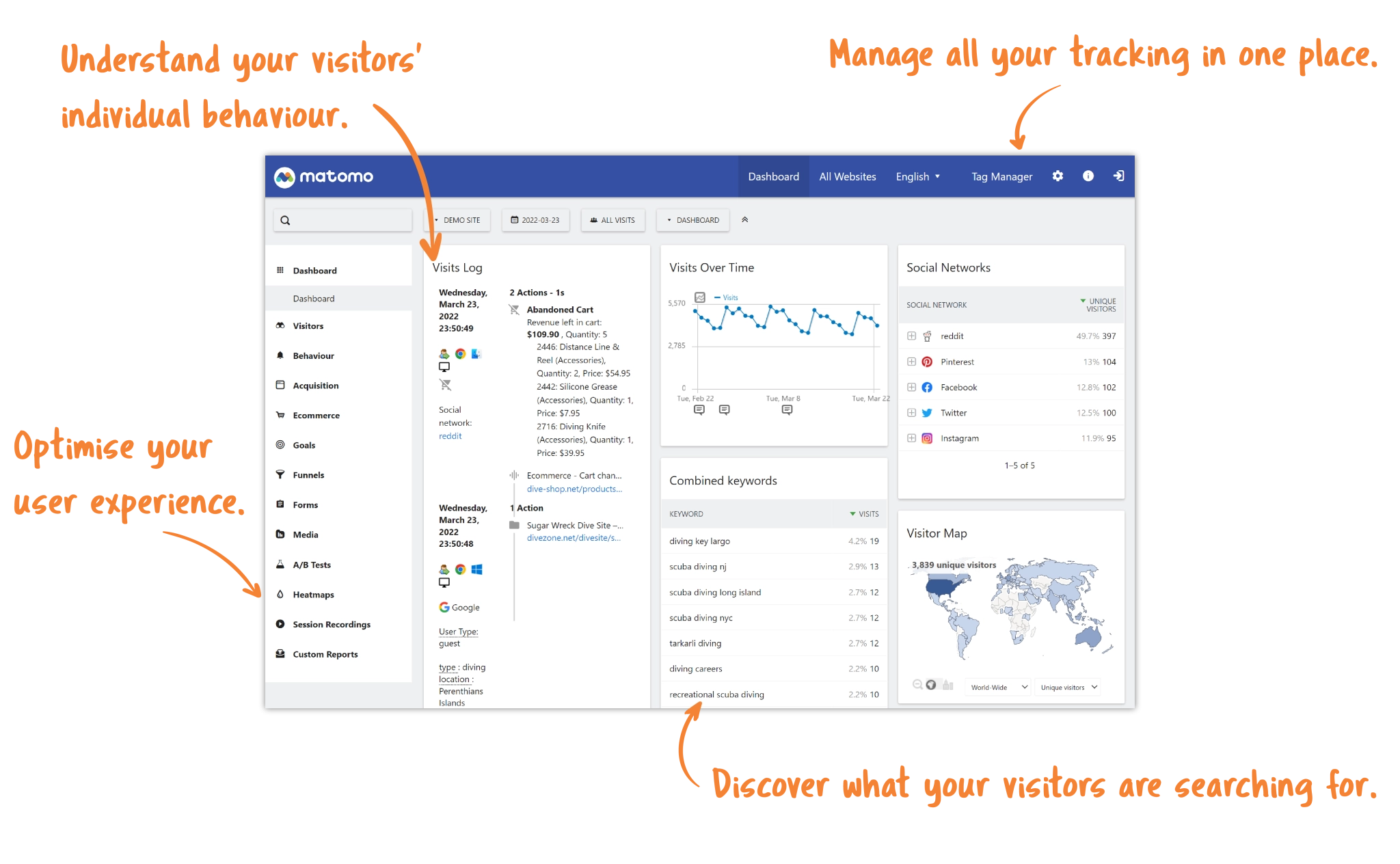
Data analysis Once the site is online and starts receiving visits, web analytics creates positive feedback and encourages further writing. You can choose fully managed services such as Baidu Analytics or Google Analytics, but I recommend self-hosted open-source analytics projects such as Matomo, because they keep your data in your own hands and offer more detailed analysis. Search engines are a major traffic source for personal blogs, so it is also very useful to analyze indexing, impressions, and click data from the search side, for example through Google’s Search Console.
Conclusion
Since the preface to HeThink Notes in 2020, I have been running this blog for nearly four years. It has gone through several rises and falls and through rounds of technical change, yet fortunately it still survives today with steady traffic. I sincerely hope this technical summary helps readers who are building their own sites, gives them a fuller sense of the static-blog stack, saves them a few detours, and helps them carve out a place of their own on the internet while contributing more knowledge to it.
On the Infrastructure and Technology Stack Behind a Static Blog